

TikTok’s Display API requires user authorization to retrieve profile information and public videos. That makes it suitable for applications connecting participating creators, rather than arbitrary public lookups. TikTok for Developers also documents a Research API for approved projects, so official access is broader than logged-in applications alone.
Developers building public monitoring tools need a retrieval method that matches their access requirements. The TikTok scraper API from Social Fetch documents handle-based profiles, video lists, comments, and discovery routes authenticated with its own API key. The following workflow uses those routes without assuming access to private content.
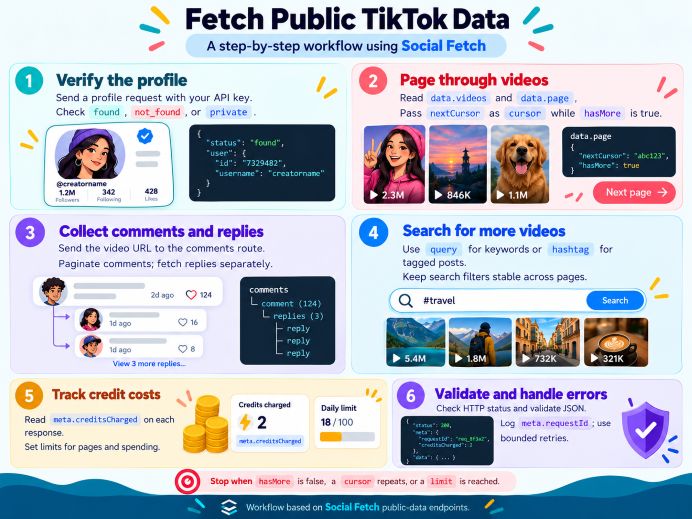
A Step-by-Step Guide to Fetching Public TikTok Data
Start with one account and one video. Confirm the response structure before expanding collection. Treat the examples below as request patterns for your backend, with credentials supplied through your deployment’s secret configuration.
1. Request and verify a profile
Send GET https://api.socialfetch.dev/v1/tiktok/profiles/charlidamelio with an x-api-key header containing your key. Social Fetch’s profile reference accepts handles with or without a leading @. For other accounts, encode the handle before inserting it into the path.
Inspect data.lookupStatus first. The documented outcomes are found, not_found, and private. Read data.profile and data.metrics only after interpreting that status. Available fields include display name, biography, verification, and follower totals.
Keep the retrieval time alongside stored records. Preserve unavailable metrics as missing values rather than converting them to zero. This recommended distinction helps your application avoid presenting incomplete information as a measured result.
2. Paginate the account’s videos
Next, request GET /v1/tiktok/profiles/charlidamelio/videos?sortBy=latest. Social Fetch’s profile-video documentation places uploads in data.videos and pagination details in data.page. Each video can include an identifier, caption, publication time, URL, and engagement statistics.
When data.page.hasMore is true, pass data.page.nextCursor as the next request’s cursor parameter. Keep the handle and sorting options unchanged. Save each completed page before requesting another, and deduplicate stored videos by identifier.
Add a page limit and stop if the cursor repeats. These are practical safeguards for your implementation. This list route has no lookupStatus, so use the earlier profile result when interpreting an empty video array.
3. Collect comments and selected replies
Choose a returned video URL and send GET /v1/tiktok/videos/comments with that URL in the url query parameter. Build the query using URLSearchParams rather than manually joining strings. Social Fetch’s comments reference documents data.comments, data.lookupStatus, and data.page.
Follow hasMore and nextCursor again. Comment page sizes vary, and the documentation warns against using totalComments alone to decide when collection is complete. Available comment fields include text, likes, author information, and replyCount.
Nested replies require /v1/tiktok/videos/comments/replies with the video url and parent commentId. Consider fetching replies only for selected discussions. Record the parent identifier so your application can reconstruct conversations without confusing replies with top-level comments.
4. Discover videos through search
For keywords, request /v1/tiktok/search?query=urban%20gardening. Social Fetch’s keyword-search reference documents datePosted, sortBy, region, and cursor options. For example, datePosted=this-week and sortBy=date-posted can narrow a recent-content workflow.
For tagged content, use /v1/tiktok/search/hashtags?hashtag=urbangardening. Social Fetch’s hashtag reference accepts a hashtag with or without #, but does not offer the keyword route’s date or sorting filters. Its region option does not guarantee every returned video originated in that country.
Keep search inputs stable while paginating. Store the originating query beside each result, and review relevance before treating returned videos as evidence of a broader trend. For related ideas on interpreting engagement metrics, explore how programming skills for TikTok engagement analysis can support monitoring and content evaluation.
5. Budget credits before expanding
The profile, standard video-list, comments, keyword, and hashtag pages each document a one-credit base or successful-request cost. Social Fetch identifies meta.creditsCharged as the billing reference. Every additional comments page is another billed request.
Optional hosted media changes the video-list calculation: its documentation specifies two additional credits per successfully hosted asset. Start with metadata collection, set a spending ceiling, and measure actual charges before scheduling recurring jobs.
Handle Errors and Parse the Envelope in TypeScript
Use a shared TypeScript request function. After fetch, check response.ok, parse JSON as unknown, and validate the route-specific shape before accessing fields. The profile reference lists 400, 401, 402, 500, 502, and 503 responses.
Repair invalid inputs or credentials before retrying. Apply bounded retries to temporary failures, with delays and a maximum attempt count. On success, separate data from meta, log meta.requestId, and record meta.creditsCharged.
A minimal TypeScript sequence is: const response = await fetch(url, { headers: { “x-api-key”: apiKey } }); if (!response.ok) throw new Error(String(response.status)); const body: unknown = await response.json(); Follow this with a runtime validator for the selected endpoint.
Define separate validated types for profiles, video pages, and comment pages. Avoid forcing every response into one universal data type. Before saving a page, verify that its collection is an array and that pagination metadata matches the documented schema.
Validate lookupStatus only on routes that provide it. Keep public-data retrieval explicit, collection bounded, and parsing defensive. That gives future monitoring jobs a clearer, more reliable foundation when available fields or upstream responses change.
